Stock Register Format - Download Stock Register Template
Useful Stock Register template for stock summary report, inventory report, stock entry report, stock value report.
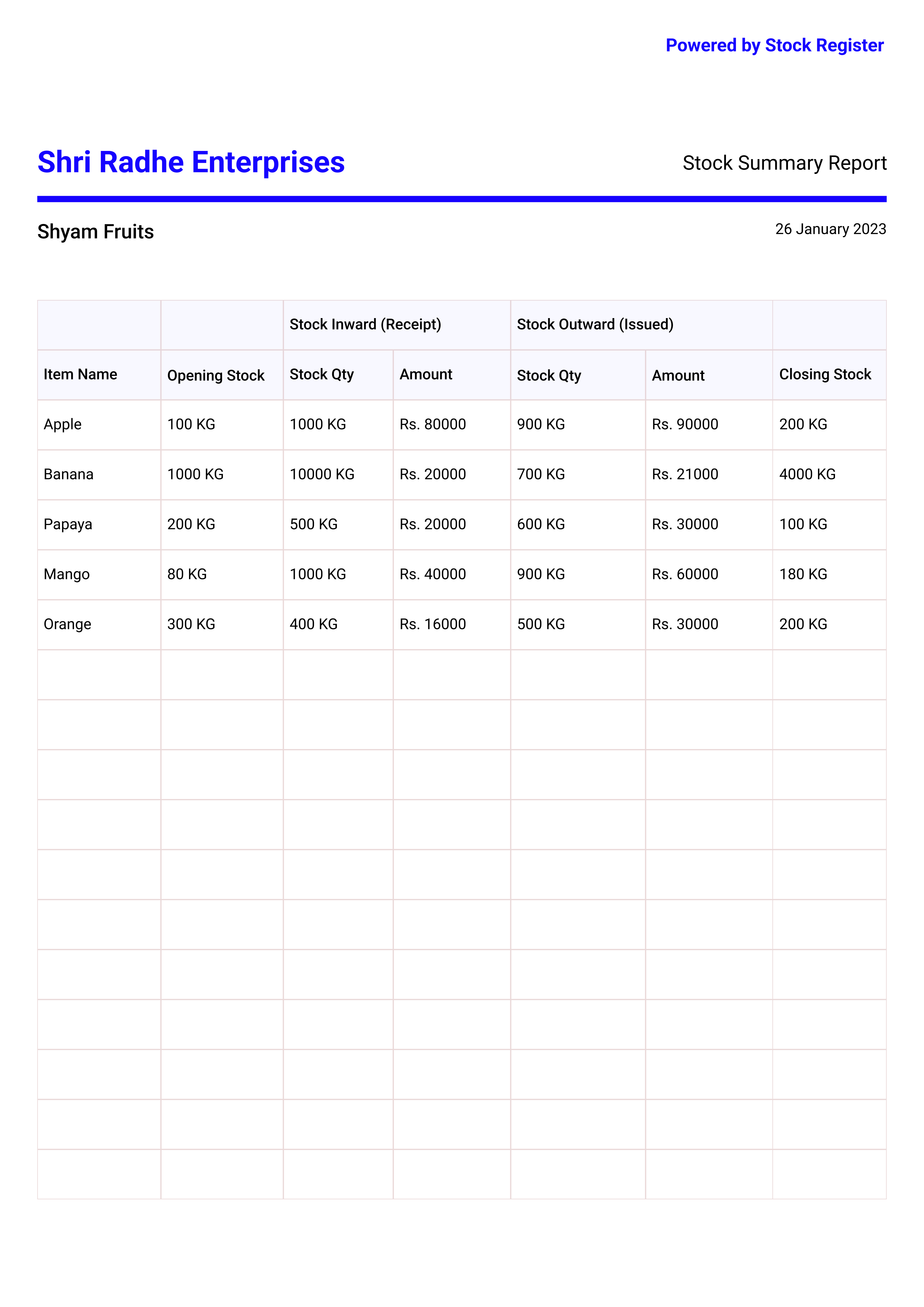
Stock Summary Report Format
Stock summary report is useful to see the inventory summary of all items for the given duration. Use this report to see the opening stock, total stock inward, total stock outward, closing stock of all items. You can create stock summary report of any day, week, month, year or any custom date range. You can create a separate stock report for all the stores and godowns. You can also a combined data in one report of all the stores & godowns.
Key Details
Opening Stock
Opening Stock is the stock available in the store/goodown at the beginning of the duration.
Stock Inward
Stock Inward is the item purchased or received in the store/godown for the given time duration.
Stock Outward
Stock Outward is the item sold or issued from the store/godown for the given time duration.
Closing Stock
Closing Stock is the stock left in the store/godown at the end of the given time duration.
Closing Stock = Opening Stock + Stock In - Stock Out
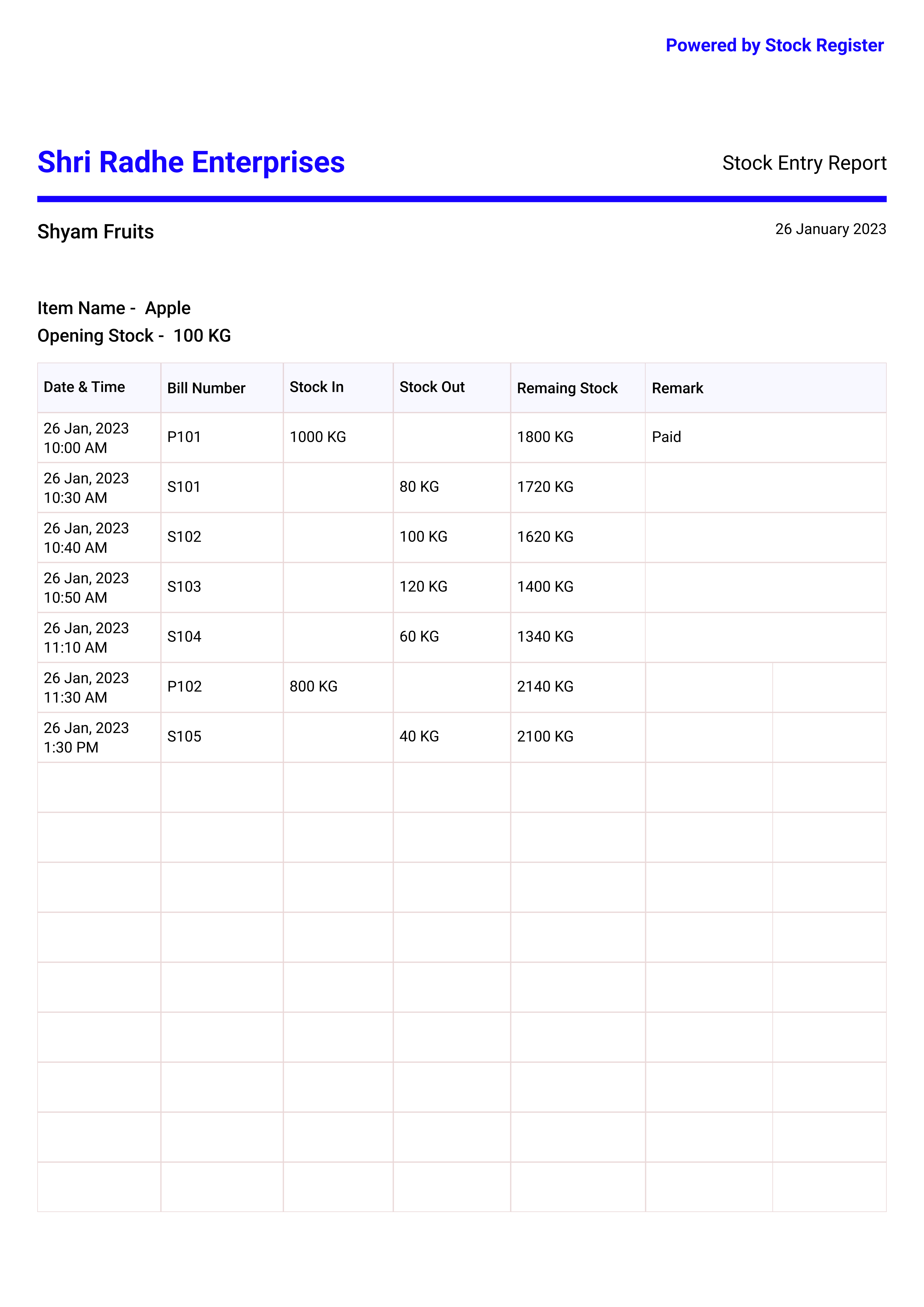
Stock Register Template For Item
Stock entry report is useful to see all the stock in, stock entries of the item for the given time period.
Use this report to see the bill number, stock in/out, remaining stock of all stock entries. All stock entries are ordered in the order of start to end time. So you can see the remaining stock at any entry level.
You can create the stock entry of any item for any time period. You can also see the remark in every stock entry.
Key Details
Bill Number
Bill Number is unique for the stock entry and useful to check more details of the entry number.
Stock Inward
Stock Inward is the item purchased or received in the store.
Stock Outward
Stock Outward is the item sold or issued from the store/godown.
Remaing Stock
Remaining Stock is stock left after the stock inward/outward entry
Remaining Stock = Opening Stock + Stock In - Stock Out
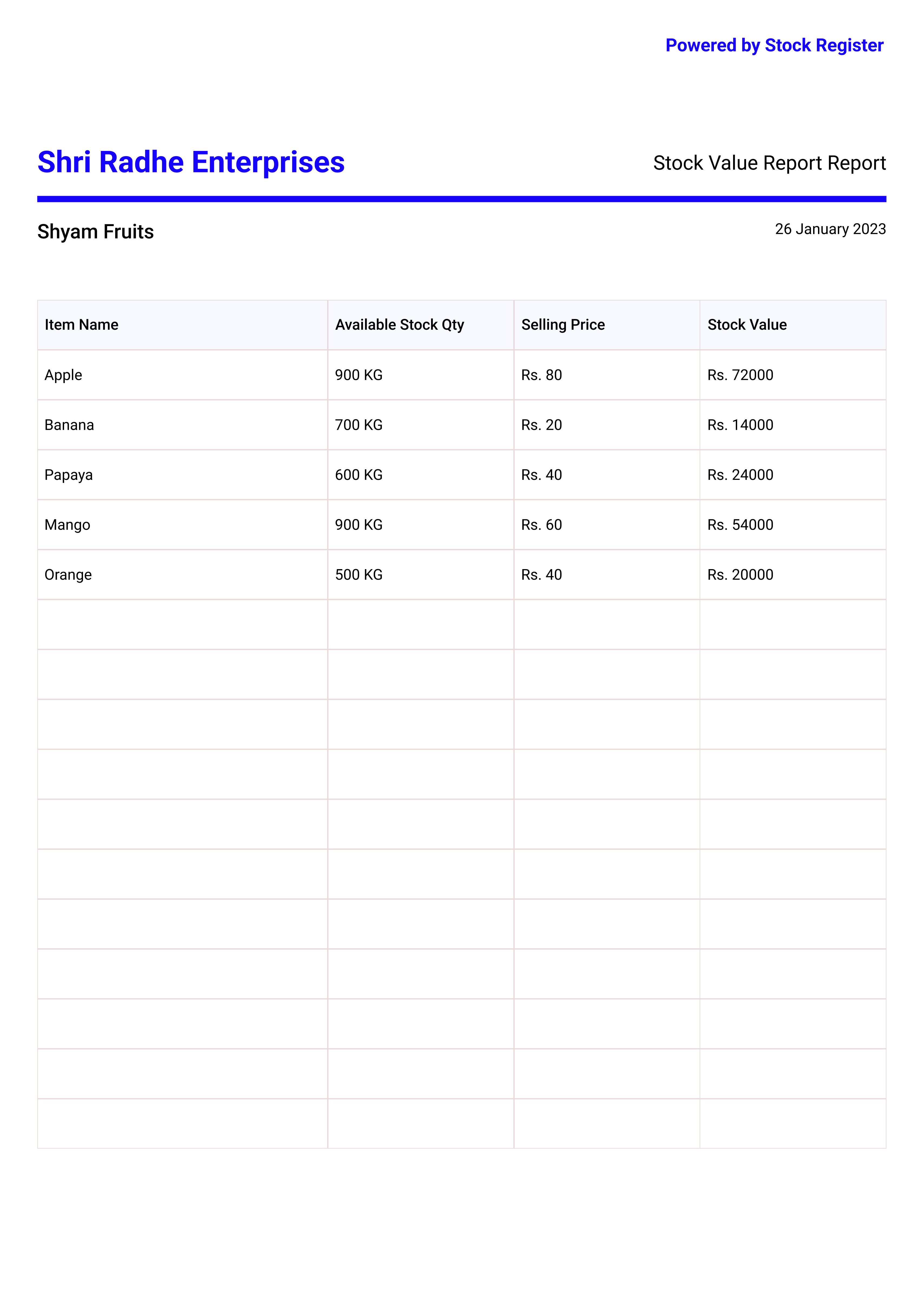
Stock Value Report Format
Stock value report is useful to stock value of each item at the time of the report generation.
Use this report to see the available stock quantity, selling price, stock value of each item.
You can create the stock value report of any store, godown.
Need help reading the numbers before you buy more? Read our stock value report guide for item, category and godown checks.
Key Details
Available Stock Qty
Available Stock Quantity is the quantity available of the item in the store/godown at the present time
Selling Price
Selling Price is the price at which item is being sold.
Stock Value
Stock Value is the total valuation of the available stock of the item in store. You can used either selling or purchase price to calculate the stock value. Stock Value = Available Stock Quantity x Item Price
Stock Value = Available Stock Quantity x Item Price
Frequently Asked Questions (FAQs)
What is a stock register format?
A stock register format is a structured document used by businesses to record and track inventory movement — including item name, opening stock, stock received (inward), stock issued (outward), and closing stock for a given period. It helps business owners know exactly how much stock is available at any point in time. A stock register can be maintained manually in a book, in Excel, or using stock management software like Stock Register.
How to maintain a stock register book?
To maintain a stock register book, record every stock transaction as it happens. For each item, note the date, bill/voucher number, quantity received (stock inward), quantity sold or issued (stock outward), and the remaining balance. Update it daily to avoid errors. Many businesses now use stock management software instead of manual books — it automatically calculates closing stock, generates reports, and reduces human error.
What is the difference between stock summary and stock entry report?
A stock summary report shows the overall picture — opening stock, total inward, total outward, and closing stock of all items for a selected period. It answers "how much stock do I have?". A stock entry report (also called item ledger) shows every individual transaction for a specific item — each purchase, sale, adjustment, and transfer with bill numbers, dates, and running balance. It answers "what happened to this item?".
What is stock statement format?
A stock statement format is a report that shows the value of all inventory held by a business at a specific date. It typically includes item name, quantity available, unit price (purchase or selling), and total stock value. Stock statements are often required by banks for loan processing, by auditors during annual audits, and by business owners to understand their working capital locked in inventory.
How to calculate closing stock in a stock register?
Closing Stock = Opening Stock + Stock Inward (purchases/received) − Stock Outward (sales/issued). For example, if you started the month with 100 units, purchased 50 more, and sold 80, your closing stock is 100 + 50 − 80 = 70 units. This closing stock becomes the opening stock for the next period.
What details should a stock register format include?
A complete stock register format should include: item name and code, unit of measurement (pieces, kg, litres etc.), opening stock quantity, date and voucher number for each stock entry, stock inward quantity (from purchase, production, or transfer), stock outward quantity (from sales, consumption, or transfer), closing stock quantity, and optionally the item rate and total value. For GST-registered businesses, HSN code should also be included.
Can I download stock register format in Excel or PDF?
Yes. You can download stock register templates in both PDF and Excel formats from this page. However, for ongoing stock management, using Stock Register App is more practical — it automatically tracks stock with every sale and purchase, generates real-time reports, and lets you download them as PDF or export to Excel anytime. Start with a 7-day free trial.
What is the difference between stock register and stock book?
Stock register and stock book refer to the same thing — a record of all inventory transactions. "Stock register" is commonly used in retail and trading businesses, while "stock book" is more common in accounting and audit contexts. Both track item-wise opening stock, inward, outward, and closing stock. The format is identical; only the name differs based on industry convention.
Want to automate stock tracking and generate these reports instantly? Try our stock management software — used by 2,00,000+ businesses across India.
Also download our free GST bill format to create professional GST invoices for your business.
All Useful Formats Used By Small Business
Create Your Stock Reports On Stock Register App
Start your 7 days free trial now. No need to pay up front. Automatic cloud data backup
Trusted by 2,00,000+ small businesses in India. Made in India